Soft constraints in a timetabling context are (strong) preferences. They should be generally met and only violated when absolutely necessary, although there is an argument for a sliding scale of soft constraint adherence.
For example, a member of staff may be unavailable on Fridays, generally, but at a push can be available. Other examples might include ensuring that students have an opportunity to eat lunch by ensuring at least 30 minutes free time between 12:00-14:00 or minimising travel between activities.
This page contains cypher queries that can be used to identify where a timetabling soft constraint has been violated.
Example soft constraints include:
Minimal Idle Time (aka no large gaps): Minimise gaps in staff and student schedules (within reason).
Spread Activities (aka maximum consecutive hours): Avoid clumping all activities for a student or staff member on one day.
Preferred Times: Consider staff and student preferences for morning, afternoon, or evening classes
Travel Time: Minimise the time students need to travel between consecutive classes (especially on large campuses), e.g. between building blocks or by lat/long
Lunch Breaks: Ensure students have sufficient time for lunch breaks.
Minimal idle time
Identifying time gaps between scheduled activities is very complex and requires several steps, clauses and comprehensions within a single query:
grouping and sorting - activities are grouped by student and date, and sorted within groups to establish the sequence
gap calculation - time difference between the end of one activity and the start of the next is calculated for consecutive pairs of activities within a day
filtering and aggregation - gaps are filtered based on threshold (e.g. 6 hours) and then the maximum gap for each day is identified
data restructuring - output is restructured.
Cypher logic for identifying gaps
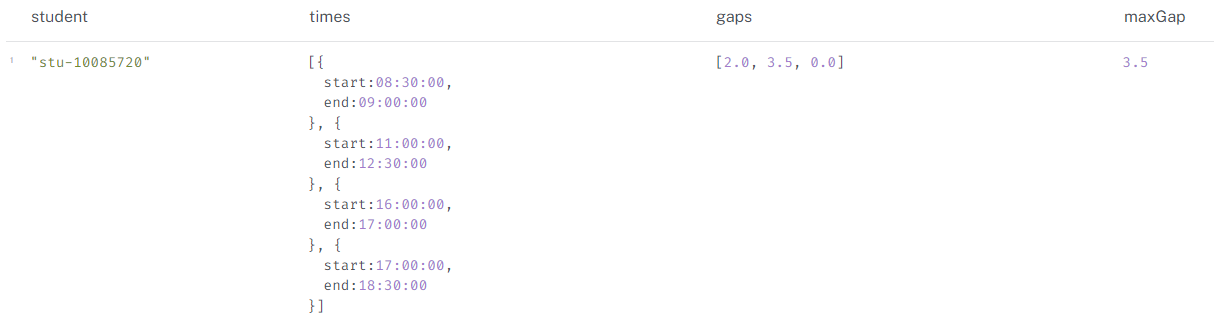
The below is the logic for identifying gaps between activities, using an example student:
MATCH (s:student)-[:ATTENDS]->(a:activity)
WHERE s.stuID_anon = "stu-10085720"
AND a.actStartDate = date("2022-10-03")
WITH s, a
ORDER BY a.actStartTime

// Collecting the start and end times of the activities
WITH s, collect({start: a.actStartTime, end: a.actEndTime}) AS times

// Calculating the gaps in minutes between consecutive activities
WITH s, times,
     [i IN range(0, size(times)-2) |
      duration.between(times[i].end, times[i+1].start).minutes / 60.0] AS gaps

// Finding the maximum gap
RETURN s.stuID_anon AS student, times, gaps, reduce(maxGap = 0.0, gap IN gaps | CASE WHEN gap > maxGap THEN gap ELSE maxGap END) AS maxGap
Identifying blocks and time gaps
Python code on graph
The below code cell returns the first 5 rows where a 6-hour maximum gap has been violated.
Click to show code
from connect_to_neo4j_db import connect_to_neo4jfrom neo4j import GraphDatabaseimport pandas as pd# connect to Neo4jdriver = connect_to_neo4j()# sessionsession = driver.session()# run query (modified RETURN clause)query ="""// students with gaps between activitiesMATCH (s:student)-[:ATTENDS]->(a:activity)WITH s, aORDER BY s.stuFirstName_anon, a.actStartDate, a.actStartTime// Group activities by student and dateWITH s, a.actStartDate AS date, collect({start: a.actStartTime, end: a.actEndTime, activity: a}) AS times// calculating the gaps in hours between consecutive activitiesWITH s, date, times, [i IN range(0, size(times)-2) | {gap: duration.between(times[i].end, times[i+1].start).minutes / 60.0, firstActivity: times[i].activity, secondActivity: times[i+1].activity}] AS gaps// filtering gaps based on a threshold of 6 hoursWITH s, date, gapsWHERE any(gapRecord IN gaps WHERE gapRecord.gap > 6.0)// Finding the maximum gap that exceeds the thresholdWITH s, date, reduce(maxGap = {gap: 0.0, firstActivity: null, secondActivity: null}, gapRecord IN gaps | CASE WHEN gapRecord.gap > maxGap.gap THEN gapRecord ELSE maxGap END) AS maxGapRecord// group by student to remove duplicationsWITH s.stuID_anon AS student, collect({date: date, activity1: maxGapRecord.firstActivity.actName, activity1_time: maxGapRecord.firstActivity.actStartTime + "-" + maxGapRecord.firstActivity.actEndTime, activity2: maxGapRecord.secondActivity.actName, activity2_time: maxGapRecord.secondActivity.actStartTime + "-" + maxGapRecord.secondActivity.actEndTime, maxGapInHours: maxGapRecord.gap}) AS gapRecords// Unwind the collected recordsUNWIND gapRecords AS record// Returning the resultRETURN student, record.date AS date, record.activity1 AS activity1, record.activity1_time AS activity1_time, record.activity2 AS activity2, record.activity2_time AS activity2_time, record.maxGapInHours AS maxGapInHoursORDER BY student, date"""print("Running query...\n")result = session.run(query)# list to hold recordsrecords = []for record in result: records.append(record)# dfdf = pd.DataFrame(records, columns=["student", "date", "activity1", "activity1_time", "activity2", "activity2_time", "maxGapInHours"])# print print(df.head(5))# close session and driversession.close()driver.close()
Alternatively, we can amend the query to return, for each date and student combination, their total scheduled hours, maximum consecutive block hours and the number of activities within the continuous block.
Click to show code
from connect_to_neo4j_db import connect_to_neo4jfrom neo4j import GraphDatabaseimport pandas as pd# connect to Neo4jdriver = connect_to_neo4j()# sessionsession = driver.session()# run query (modified RETURN clause)query ="""// calculates - total hours, max block hours, max block activities per day // to be used for max block hours and max block activities per day// logic - example// matches specified student and all attended activitiesMATCH (s:student {stuID_anon:"stu-10085720"})-[:ATTENDS]->(a:activity)// sorts activities by start date and then by start time within each dateWITH s, a ORDER BY a.actStartDate, a.actStartTime// calculates total hours spent on activities for each dateWITH s, a.actStartDate AS date, SUM(a.actDurationInMinutes) / 60.0 AS totalHours, // groups activities into blocks based on time overlaps REDUCE( blockInfo = [], activity IN COLLECT(a) | CASE WHEN blockInfo = [] THEN [[activity]] ELSE CASE WHEN head(last(blockInfo)).actEndTime >= activity.actStartTime THEN blockInfo[..-1] + [last(blockInfo) + activity] ELSE blockInfo + [[activity]] END END ) AS blocks// unwinds the list of blocks, processing each block individuallyUNWIND blocks AS block// calculates the total duration in hours for each blockWITH s, date, totalHours, blocks, REDUCE(blockHours = 0.0, activity IN block | blockHours + activity.actDurationInMinutes) / 60.0 AS blockHours, SIZE(block) AS blockActivities// returns aggregated resultsRETURN s.stuFullName_anon AS student, date, totalHours, MAX(blockHours) AS blockHours, MAX(blockActivities) AS blockActivitiesORDER BY date;"""print("Running query...\n")result = session.run(query)# list to hold recordsrecords = []for record in result: records.append(record)# dfdf = pd.DataFrame(records, columns=["student", "date", "totalHours", "blockHours", "blockActivities"])# print print(df.head(5))# close session and driversession.close()driver.close()
Example Use case - identifying students with 5+ hours in a single block
This query returns the first five rows where a student has more than 5 consecutive scheduled hours on a date.
Click to show code
from connect_to_neo4j_db import connect_to_neo4jfrom neo4j import GraphDatabaseimport pandas as pd# connect to Neo4jdriver = connect_to_neo4j()# sessionsession = driver.session()# run query (modified RETURN clause)query ="""MATCH (s:student)-[:ATTENDS]->(a:activity)<-[:TEACHES]-(:staff) // Filter for teaching activitiesWITH s, a ORDER BY a.actStartDate, a.actStartTimeWITH s, a.actStartDate AS date, SUM(a.actDurationInMinutes) / 60.0 AS totalHours, REDUCE( blockInfo = [], activity IN COLLECT(a) | CASE WHEN blockInfo = [] THEN [[activity]] ELSE CASE WHEN head(last(blockInfo)).actEndTime >= activity.actStartTime THEN blockInfo[..-1] + [last(blockInfo) + activity] ELSE blockInfo + [[activity]] END END ) AS blocksUNWIND blocks AS blockWITH s, date, totalHours, blocks, REDUCE(blockHours = 0.0, activity IN block | blockHours + activity.actDurationInMinutes) / 60.0 AS blockHours, SIZE(block) AS blockActivitiesWHERE blockHours > 5 // Filter for blocks with more than 5 hoursRETURN s.stuFullName_anon AS student, date, totalHours, blockHours, blockActivitiesORDER BY date;"""print("Running query...\n")result = session.run(query)# list to hold recordsrecords = []for record in result: records.append(record)# dfdf = pd.DataFrame(records, columns=["student", "date", "totalHours", "blockHours", "blockActivities"])# print print(df.head(5))# close session and driversession.close()driver.close()
Connecting to Neo4j database....
Connected to Neo4j database successfully! Driver: <neo4j._sync.driver.Neo4jDriver object at 0x00000260F8494990>
Running query...

             student        date  totalHours  blockHours  blockActivities
0        Jacob Jones  2022-07-19         5.5         5.5                2
1      Rachael Moore  2022-07-19         5.5         5.5                2
2        Kayla Sharp  2022-07-19         5.5         5.5                2
3         David Rose  2022-07-19         5.5         5.5                2
4  Francisco Holland  2022-07-19         5.5         5.5                2
Total hours per day
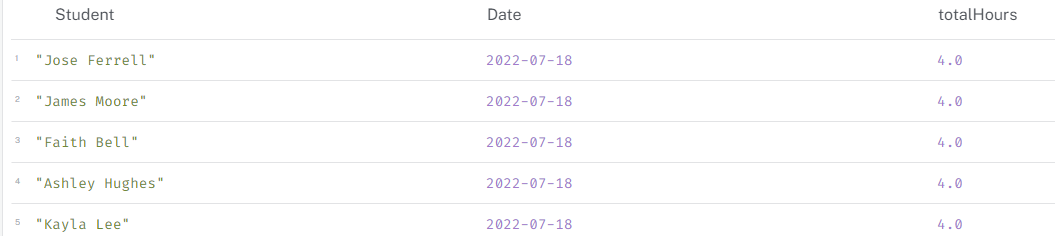
In contrast, calculating simple total hours per day is achieved by:
MATCH (s:student )-[:ATTENDS]->(a:activity)
WITH s, a.actStartDate AS Date, SUM(a.actDurationInMinutes) / 60.0 AS totalHours
RETURN s.stuFullName_anon AS Student, Date, totalHours
ORDER BY Date;
Total hours per day
Longest consecutive block of activities per day
We can use the earlier cypher logic to identify the longest consecutive block of activities for a student, or student on a day, etc.
MATCH (s:student {stuFullName_anon: "Susan Lopez"})-[:ATTENDS]->(a:activity {actStartDate: date("2022-09-27")})
WITH s, a
ORDER BY a.actStartTime
WITH s, COLLECT(a) AS activities
WITH s, activities,
     REDUCE(
       state = {currentBlock: {duration: 0, start: null, end: null}, longestBlock: {duration: 0, start: null, end: null}},
       activity IN activities |
         CASE
           WHEN state.currentBlock.end IS NULL OR
                activity.actStartTime > state.currentBlock.end
           THEN {
             currentBlock: {
               duration: activity.actDurationInMinutes,
               start: activity.actStartTime,
               end: activity.actEndTime
             },
             longestBlock:
               CASE
                 WHEN activity.actDurationInMinutes > state.longestBlock.duration
                 THEN {
                   duration: activity.actDurationInMinutes,
                   start: activity.actStartTime,
                   end: activity.actEndTime
                 }
                 ELSE state.longestBlock
               END
           }
           ELSE {
             currentBlock: {
               duration: (activity.actEndTime.hour * 60 + activity.actEndTime.minute) -
                         (state.currentBlock.start.hour * 60 + state.currentBlock.start.minute),
               start: state.currentBlock.start,
               end: activity.actEndTime
             },
             longestBlock:
               CASE
                 WHEN ((activity.actEndTime.hour * 60 + activity.actEndTime.minute) -
                       (state.currentBlock.start.hour * 60 + state.currentBlock.start.minute)) > state.longestBlock.duration
                 THEN {
                   duration: (activity.actEndTime.hour * 60 + activity.actEndTime.minute) -
                             (state.currentBlock.start.hour * 60 + state.currentBlock.start.minute),
                   start: state.currentBlock.start,
                   end: activity.actEndTime
                 }
                 ELSE state.longestBlock
               END
           }
         END
     ) AS finalState
RETURN
  s.stuFullName_anon AS stuName,
  activities[0].actStartDate AS date,
  finalState.longestBlock.duration AS longestConsecutiveBlockDuration,
  finalState.longestBlock.start AS blockStartTime,
  finalState.longestBlock.end AS blockEndTime
Example - longest consecutive block for ‘Susan Lopez’ on 2022-09-27
The below finds the longest consecutive block in a day for a student:
Click to show code
from connect_to_neo4j_db import connect_to_neo4jfrom neo4j import GraphDatabaseimport pandas as pd# connect to Neo4jdriver = connect_to_neo4j()# sessionsession = driver.session()# run query (modified RETURN clause)query ="""MATCH (s:student {stuFullName_anon: "Susan Lopez"})-[:ATTENDS]->(a:activity{actStartDate: date("2022-09-27")})WITH s, a ORDER BY a.actStartTimeWITH s, COLLECT(a) AS activitiesWITH s, activities, REDUCE( state = {currentBlock: {duration: 0, start: null, end: null}, longestBlock: {duration: 0, start: null, end: null}}, activity IN activities | CASE WHEN state.currentBlock.end IS NULL OR activity.actStartTime > state.currentBlock.end THEN { currentBlock: { duration: activity.actDurationInMinutes, start: activity.actStartTime, end: activity.actEndTime }, longestBlock: CASE WHEN activity.actDurationInMinutes > state.longestBlock.duration THEN { duration: activity.actDurationInMinutes, start: activity.actStartTime, end: activity.actEndTime } ELSE state.longestBlock END } ELSE { currentBlock: { duration: (activity.actEndTime.hour * 60 + activity.actEndTime.minute) - (state.currentBlock.start.hour * 60 + state.currentBlock.start.minute), start: state.currentBlock.start, end: activity.actEndTime }, longestBlock: CASE WHEN ((activity.actEndTime.hour * 60 + activity.actEndTime.minute) - (state.currentBlock.start.hour * 60 + state.currentBlock.start.minute)) > state.longestBlock.duration THEN { duration: (activity.actEndTime.hour * 60 + activity.actEndTime.minute) - (state.currentBlock.start.hour * 60 + state.currentBlock.start.minute), start: state.currentBlock.start, end: activity.actEndTime } ELSE state.longestBlock END } END ) AS finalStateRETURNs.stuFullName_anon AS student,activities[0].actStartDate AS date,finalState.longestBlock.duration AS longestConsecutiveBlockDuration,finalState.longestBlock.start AS blockStartTime,finalState.longestBlock.end AS blockEndTime"""print("Running query...\n")result = session.run(query)# list to hold recordsrecords = []for record in result: records.append(record)# dfdf = pd.DataFrame(records, columns=["student", "date", "longestConsecutiveBlockDuration", "blockStartTime", "blockEndTime"])# print print(df.head(5))# close session and driversession.close()driver.close()
Connecting to Neo4j database....
Connected to Neo4j database successfully! Driver: <neo4j._sync.driver.Neo4jDriver object at 0x00000260DD8DE090>
Running query...

       student        date  longestConsecutiveBlockDuration  \
0  Susan Lopez  2022-09-27                              300

       blockStartTime        blockEndTime
0  13:00:00.000000000  18:00:00.000000000
Max hours in a day
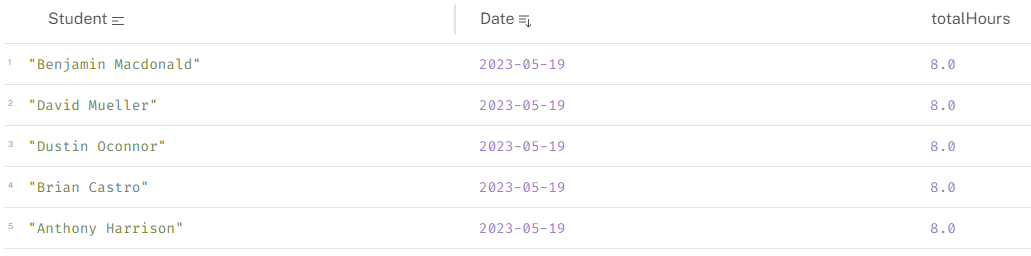
This query calculates the total scheduled hours for each student on a day and returns the results ordered by date. This example filters for students who have more than 7 hours of activities in a day.
// sum of activity durations
// does not account for simultaneous activities (clashes) - so could be inflated, e.g. 12.5 hour students

MATCH (s:student)-[:ATTENDS]->(a:activity)
WITH s, a.actStartDate AS Date, SUM(a.actDurationInMinutes) / 60.0 AS totalHours
WHERE totalHours > 7 // Set  maximum here
RETURN s.stuFullName_anon AS Student, Date, totalHours
ORDER BY Date;
Max hours in a day
Travel time between activities
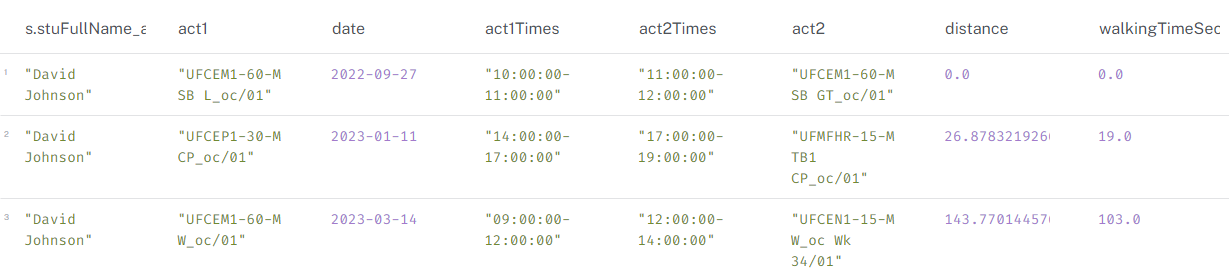
This query calculates the travel time between consecutive activities for a student on a specific date. It uses the lat/long coordinates of the buildings to calculate the distance and time taken to travel between them and a default walking speed of 1.4 m/s to calculate time.
This is a simple example and does not account for factors like traffic, walking speed, or other modes of transport.
// Calculate travel time between consecutive activities for a student on a specific date
MATCH (s:student {stuFullName_anon: "David Johnson"})-[:ATTENDS]->(a1:activity)-[:OCCUPIES]->(r1:room),
      (s)-[:ATTENDS]->(a2:activity)-[:OCCUPIES]->(r2:room)
WHERE a1.actEndTime = a2.actStartTime AND a1.actStartDate = a2.actStartDate AND a1 <> a2 AND
      a1.actStartDate IN [date("2023-01-11"), date("2022-09-27"), date("2023-03-14")]
RETURN DISTINCT
    s.stuFullName_anon,
    a1.actName AS act1, a1.actStartDate AS date, a1.actStartTime+"-"+a1.actEndTime AS act1Times, a2.actStartTime+"-"+a2.actEndTime AS act2Times, a2.actName AS act2,
    point.distance(r1.location, r2.location) AS distance,
    round(point.distance(r1.location, r2.location) / 1.4) AS walkingTimeSeconds // Calculate walking time in seconds
Travel time between activities
Lunch breaks
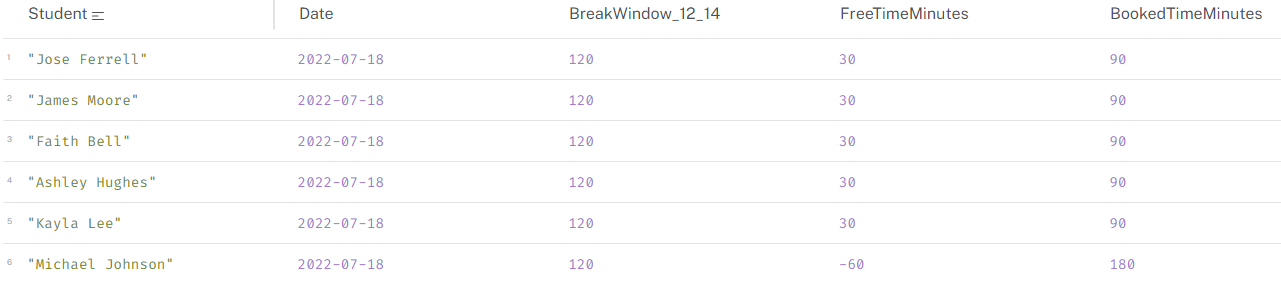
It might be expected that a student (or staff) has a lunch break. The cypher below calculates free and booked tie within a window, in this case 12:00 and 14:00. It can be used to find students who do not have a lunch break or count the number of days that a student does not have a lunch break.
MATCH (s:student)-[:ATTENDS]->(a:activity)
WITH s, a
ORDER BY a.actStartDate, a.actStartTime
WITH s, COLLECT(a) AS activities
UNWIND activities AS activity
WITH s.stuFullName_anon AS Student, activity.actStartDate AS Date, time(activity.actStartTime) AS StartTime, time(activity.actEndTime) AS EndTime, duration.between(time('12:00'), time('14:00')).minutes AS BreakWindow_12_14
WITH Student, Date, BreakWindow_12_14, COLLECT([StartTime, EndTime]) AS Activities
UNWIND Activities AS activity
WITH Student, Date, BreakWindow_12_14, activity[0] AS StartTime, activity[1] AS EndTime
WITH Student, Date, BreakWindow_12_14,
     CASE
       WHEN StartTime >= time('14:00') OR EndTime <= time('12:00') THEN 0
       WHEN StartTime < time('12:00') AND EndTime > time('14:00') THEN BreakWindow_12_14
       WHEN StartTime >= time('12:00') AND StartTime < time('14:00') THEN duration.between(StartTime, time('14:00')).minutes
       WHEN EndTime > time('12:00') AND EndTime <= time('14:00') THEN duration.between(time('12:00'), EndTime).minutes
     END AS BookedDurationMinutes
RETURN Student, Date, BreakWindow_12_14, BreakWindow_12_14 - SUM(BookedDurationMinutes) AS FreeTimeMinutes, SUM(BookedDurationMinutes) AS BookedTimeMinutes
ORDER BY Date
Identifying lunch breaks
Interestingly, Michael Johnson has a negative lunch break! A quick look showed that there are actually two Michael Johnsons attending this class and they both have 30 minutes free time in the 2-hour lunch break window.
Because the query was written using student name, it is incorrectly aggregating the two students into one person as follows:
To remedy this, the query can be updated to use student ID or a different unique identifier. I would also like to update the anonymisation function in the ETL so that it does not duplicate names in the output.