“Hard constraints” in a timetabling context are generally rules or conditions which cannot be violated. Violation would indicate non-viable timetable, e.g. a lecturer being scheduled to teach in two places simultaneously. In reality, hard constraints appear in timetables and are accepted with real-world workarounds.
This page contains cypher queries that can be used to identify where a timetabling hard constraint has been violated.
Example hard constraints include:
All Activities Scheduled: Every lecture, tutorial, lab, etc., must have a designated time and place.
No Room Conflicts (aka room clash): Two activities cannot be scheduled in the same room at the same time.
Room Capacity Sufficient: The room assigned to an activity must accommodate the expected number of students
Person clashes: People, that is staff and students, cannot be allocated to two or more activities occurring at the same time.
No Staff Conflicts (aka staff clash)
No Student Conflicts (aka student clash)
Staff Availability Respected: Activities cannot be scheduled during a staff member’s unavailable times (e.g., research days, meetings, unavailability pattern).
Curriculum Requirements Met: Required courses must be offered at times when students can take them
Unscheduled activities
Unscheduled activities can be identified as follows. This query can be tweaked to also search for matches where the property equals ’’ - that is, a blank.
MATCH (a:activity)
WHERE a.actStartDate IS NULL
OR a.actStartTime IS NULL
OR a.actEndTime IS NULL
RETURN a
Room clashes
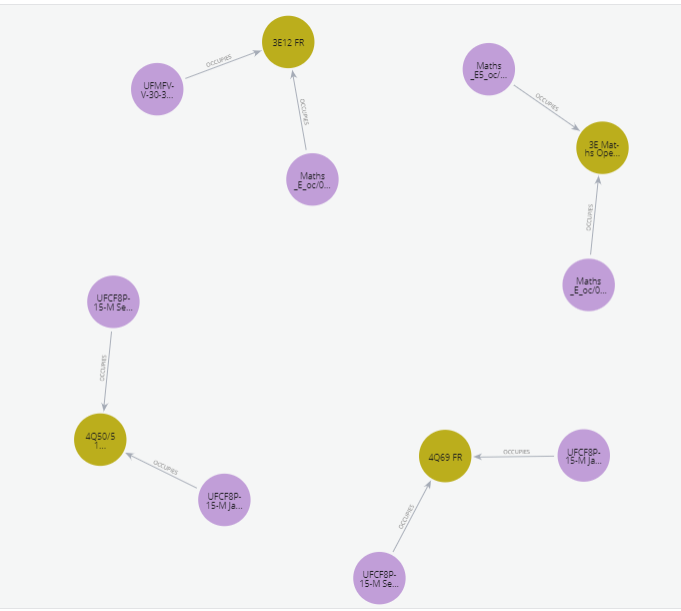
Room or location clashes are where two or more activities are scheduled at the same datetime in the same space and this is not deliberate. These can be identified with the starter query below. The image clearly shows pairs of activities sharing one location. In reality, I suspect that these are deliberate clashes.
MATCH (a1:activity)-[r1:OCCUPIES]->(r:room)<-[r2:OCCUPIES]-(a2:activity)
WHERE a1.actStartDate = a2.actStartDate AND a1 <> a2
    AND (
        (a1.actStartTime <= a2.actStartTime AND a1.actEndTime > a2.actStartTime)
        OR
        (a2.actStartTime <= a1.actStartTime AND a2.actEndTime > a1.actStartTime)
    )
RETURN a1, a2, r, r1, r2
Room Clashes
The same results have been returned as a table.
Click to show code
from connect_to_neo4j_db import connect_to_neo4jfrom neo4j import GraphDatabaseimport pandas as pd# connect to Neo4jdriver = connect_to_neo4j()# sessionsession = driver.session()# run queryquery ="""MATCH (a1:activity)-[r1:OCCUPIES]->(r:room)<-[r2:OCCUPIES]-(a2:activity)WHERE r.roomName IN ["4Q50/51 FR", "4Q69 FR", "3E Maths Open Zone A", "3E12 FR"] AND a1.actStartDate = a2.actStartDate AND a1 <> a2 AND ( (a1.actStartTime <= a2.actStartTime AND a1.actEndTime > a2.actStartTime) OR (a2.actStartTime <= a1.actStartTime AND a2.actEndTime > a1.actStartTime) )RETURN a1.actName AS activity1, a2.actName AS activity2, r.roomName AS room, a1.actStartDate AS date, a1.actStartTime AS activity1_start, a1.actEndTime AS activity1_end, a2.actStartTime AS activity2_start, a2.actEndTime AS activity2_end"""print("Running query...\n")result = session.run(query)# list to hold recordsrecords = []for record in result: records.append(record)# dfdf = pd.DataFrame(records, columns=["activity1", "activity2", "room", "date", "activity1_start", "activity1_end", "activity2_start", "activity2_end"])# printprint(df)# close session and driversession.close()driver.close()
Connecting to Neo4j database....
Connected to Neo4j database successfully! Driver: <neo4j._sync.driver.Neo4jDriver object at 0x000001F76AA17DD0>
Running query...

                          activity1                         activity2  \
0          UFCF8P-15-M Sep W2_oc/01  UFCF8P-15-M Jan Cont W2_oc jt/01
1  UFCF8P-15-M Jan Cont W2_oc jt/01          UFCF8P-15-M Sep W2_oc/01
2          UFCF8P-15-M Sep W1_oc/01  UFCF8P-15-M Jan Cont W1_oc jt/01
3  UFCF8P-15-M Jan Cont W1_oc jt/01          UFCF8P-15-M Sep W1_oc/01
4                     Maths_E_oc/01                    Maths_E5_oc/01
5                    Maths_E5_oc/01                     Maths_E_oc/01
6                     Maths_E_oc/01              UFMFVV-30-3 DI_oc/01
7              UFMFVV-30-3 DI_oc/01                     Maths_E_oc/01

                   room        date     activity1_start       activity1_end  \
0            4Q50/51 FR  2022-12-13  16:00:00.000000000  17:30:00.000000000
1            4Q50/51 FR  2022-12-13  16:00:00.000000000  17:30:00.000000000
2               4Q69 FR  2022-12-13  14:00:00.000000000  15:30:00.000000000
3               4Q69 FR  2022-12-13  14:00:00.000000000  15:30:00.000000000
4  3E Maths Open Zone A  2022-11-09  09:00:00.000000000  17:00:00.000000000
5  3E Maths Open Zone A  2022-11-09  16:00:00.000000000  17:00:00.000000000
6               3E12 FR  2022-11-08  09:00:00.000000000  17:00:00.000000000
7               3E12 FR  2022-11-08  15:00:00.000000000  16:00:00.000000000

      activity2_start       activity2_end
0  16:00:00.000000000  17:30:00.000000000
1  16:00:00.000000000  17:30:00.000000000
2  14:00:00.000000000  15:30:00.000000000
3  14:00:00.000000000  15:30:00.000000000
4  16:00:00.000000000  17:00:00.000000000
5  09:00:00.000000000  17:00:00.000000000
6  15:00:00.000000000  16:00:00.000000000
7  09:00:00.000000000  17:00:00.000000000
Room capacity exceeded
This query identifies activities where the number of students exceeds the room capacity. It includes an optional WHERE clause if looking at a specific date range.
MATCH (r:room)<-[r1:OCCUPIES]-(a:activity)<-[:ATTENDS]-(s:student)
//WHERE a.Date >= date("2022-01-01") AND a.Date <= date("2022-06-30")
WITH r, a, count(s) as numStudents
WHERE numStudents > r.roomCapacity
RETURN r, a.actStartDate, a.actName AS Activity, r.roomCapacity, numStudents - r.roomCapacity AS extraNeeded
ORDER BY extraNeeded DESC
These are the results in a dataframe:
Click to show code
from connect_to_neo4j_db import connect_to_neo4jfrom neo4j import GraphDatabaseimport pandas as pd# connect to Neo4jdriver = connect_to_neo4j()# sessionsession = driver.session()# run queryquery ="""MATCH (r:room)<-[r1:OCCUPIES]-(a:activity)<-[:ATTENDS]-(s:student)//WHERE a.Date >= date("2022-01-01") AND a.Date <= date("2022-06-30") WITH r, a, count(s) as numStudentsWHERE numStudents > r.roomCapacityRETURN DISTINCT r.roomName, r.roomType, a.actName AS Activity, r.roomCapacity, numStudents - r.roomCapacity AS extraNeededORDER BY extraNeeded DESC"""print("Running query...\n")result = session.run(query)# list to hold recordsrecords = []for record in result: records.append(record)# dfdf = pd.DataFrame(records, columns=["roomName", "roomType", "Activity", "roomCapacity", "extraNeeded"])# printprint("Printing first 5 records...\n")print(df.head())# close the session and driversession.close()driver.close()
Connecting to Neo4j database....
Connected to Neo4j database successfully! Driver: <neo4j._sync.driver.Neo4jDriver object at 0x000001F76C5B6750>
Running query...

Printing first 5 records...

               roomName  roomType       Activity  roomCapacity  extraNeeded
0              3E006 FR  FAC STUD  Maths_E_oc/01             4           88
1              3E007 FR  FAC STUD  Maths_E_oc/01             4           88
2  3E Maths Open Zone B  FAC STUD  Maths_E_oc/01            12           80
3               3E28 FR  TEACHING  Maths_E_oc/01            24           68
4               3E12 FR    PC LAB  Maths_E_oc/01            30           62
Student clashes
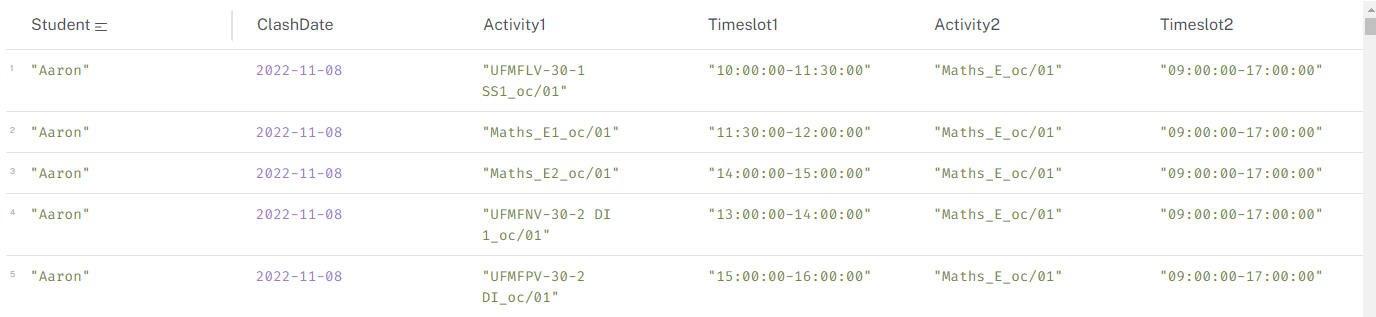
This query identifies students who are scheduled to attend two or more activities at the same time. Identifying clashes is a complex undertaking and it is one where the graph structure in terms of nodes, properties and relationships could potentially make a significant different to performance.
The reason for the complexity is that you need to look for overlapping times between two activities for each date, for each student. The query to achieve this and the ensuing calculations will vary significantly depending on the structure and syntax.
Because of this, I explored the student clash scenario in more detail here: Student Clashes
MATCH (s:student)-[:ATTENDS]->(a1:activity)
WITH s, a1
MATCH (s)-[:ATTENDS]->(a2:activity)
WHERE a1 <> a2
  AND a1.actStartDate = a2.actStartDate
  AND (a1.actStartTime < a2.actEndTime AND a1.actEndTime > a2.actStartTime)
  AND NOT (a1.actStartTime = a2.actEndTime OR a1.actEndTime = a2.actStartTime)
  AND a1.actName < a2.actName  // Ensure only one direction of the pair is returned
RETURN s.stuFirstName_anon AS Student,
       a1.actStartDate AS ClashDate,
       a1.actName AS Activity1,
       a1.actStartTime + "-" + a1.actEndTime AS Timeslot1,
       a2.actName AS Activity2,
       a2.actStartTime + "-" + a2.actEndTime AS Timeslot2
ORDER BY Student, ClashDate;