This page contains a selection of count queries used to explore the graph database. The queries are designed to provide insights into the data and relationships between nodes. They can be considered starter queries which can be amended depending on the requirements.
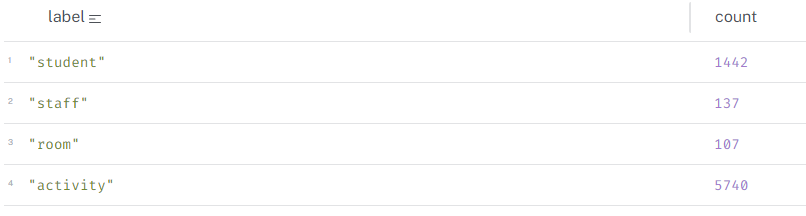
Count all nodes - by label
Below are two queries returning the same results - counts of nodes by node label.
// Count of nodes - row per node

UNWIND ["student", "staff", "room", "activity"] AS label
MATCH (n)
WHERE label IN labels(n)
RETURN label, count(n) AS count
Count All Nodes
// Count of nodes - single row

MATCH (n:student)
WITH count(n) AS studentCount
MATCH (n:staff)
WITH studentCount, count(n) AS lecturerCount
MATCH (n:room)
WITH studentCount, lecturerCount, count(n) AS roomCount
MATCH (n:activity)
RETURN studentCount, lecturerCount, roomCount, count(n) AS activityCount
Count All Nodes
Count all relationships - by type
The query below returns counts of relationships. We can see that there are a significant amount of (student)-[]->(activity) relationships due to how we structured activity in the graph - that is, a separate node for each instance.
// Count of relationships

MATCH ()-[r:ATTENDS]->()
WITH count(r) AS attendsCount
MATCH ()-[r:TEACHES]->()
WITH attendsCount, count(r) AS teachesCount
MATCH ()-[r:OCCUPIES]->()
WITH attendsCount, teachesCount, count(r) AS occupiesCount
MATCH ()-[r:BELONGS_TO]->()
RETURN attendsCount, teachesCount, occupiesCount, count(r) AS belongsCount
Count All Relationships
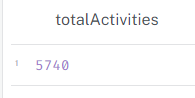
Activity counts
In this graph, an activity is an instance of an activity, that is, a unique combination of name, date, start, end, location, staff. It means a lot of activities!
// Count of activities

MATCH (a:activity)
RETURN count(a) AS totalActivities;
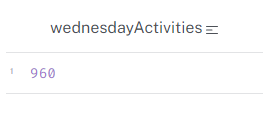
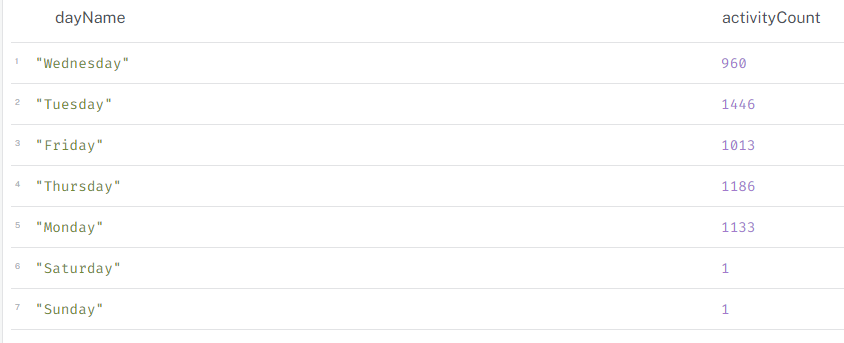
// Count of activities on a day

MATCH (a:activity)
WHERE a.actDayName = "Wednesday"
RETURN DISTINCT count(a) AS wednesdayActivities
MATCH (a:activity)
RETURN DISTINCT a.actDayName AS dayName, count(a) AS activityCount
Activity counts by time
The query below connects to the graph via python and returns the result - that is, the number of activities which start at 17:00.
Click to show code
from connect_to_neo4j_db import connect_to_neo4jfrom neo4j import GraphDatabase# connect to Neo4jdriver = connect_to_neo4j()# sessionsession = driver.session()# run queryquery ="""// Activity count by time (start)MATCH (a:activity)WHERE a.actStartTime = localtime("17:00:00")//AND a.actDayName = "Wednesday"RETURN count(a) AS activitiesStartingAt5pm"""print("Running query...\n")result = session.run(query)for record in result:print(record)# close the session and driversession.close()driver.close()
Connecting to Neo4j database....
Connected to Neo4j database successfully! Driver: <neo4j._sync.driver.Neo4jDriver object at 0x0000027FA1066C50>
Running query...

<Record activitiesStartingAt5pm=172>
Staff activity count
This query returns the first 5 rows of the query which counts activities by member of staff.
Click to show code
from connect_to_neo4j_db import connect_to_neo4jfrom neo4j import GraphDatabaseimport pandas as pd# connect to Neo4jdriver = connect_to_neo4j()# sessionsession = driver.session()# run queryquery ="""// Staff activity countMATCH (st:staff)-[r:TEACHES]->(a:activity)RETURN st.staffFullName_anon AS staffName, count(a) AS activityCountORDER BY activityCount DESC"""print("Running query...\n")result = session.run(query)# list to hold recordsrecords = []for record in result: records.append(record)# df of first 5 recordsdf = pd.DataFrame(records[:5], columns=["staffName", "activityCount"])# printprint(df)# close the session and driversession.close()driver.close()
Connecting to Neo4j database....
Connected to Neo4j database successfully! Driver: <neo4j._sync.driver.Neo4jDriver object at 0x0000027FA10CE6D0>
Running query...

        staffName  activityCount
0  Debbie Nichols            145
1  Marc Hernandez            127
2    Eileen Allen            126
3    Steven Perez            124
4  Justin Alvarez            112